FieldCue vs MeetGeek: Meeting Productivity or GoHighLevel Sales Automation?
MeetGeek is an affordable AI meeting assistant focused on automated summaries. FieldCue is a sales-intelligence platform designed specifically to sync phone calls and CRM records natively in GoHighLevel.
"Best for GoHighLevel users who need direct CRM custom field updates, pipeline stage shifting, and phone call transcription."
💡 Quick Verdict
Choose MeetGeek for affordable video-meeting summaries, multilingual notes and flexible workflow distribution. Choose FieldCue when GoHighLevel phone calls must become scorecards, custom fields, opportunities and follow-up tasks.
Affordable meeting summaries and action items
GoHighLevel contact custom-field mapping and opportunity logic
Compare all major capabilities
Comparison information was last reviewed on July 6, 2026. Product features and pricing can change. “Native” means a documented first-party connection, not a possible Zapier, Make or custom API workflow.
Disclaimer: Any financial results, close-rate increases, time savings, or ROI projections mentioned on this page or calculated using our tools are illustrative estimates only. Actual results vary based on representative performance, lead quality, market conditions, and individual business execution. FieldCue does not guarantee any specific financial outcomes, revenue growth, or conversion metrics.
| Feature Group & Capability | ⭐ FieldCue | MeetGeek |
|---|---|---|
| Call and meeting capture | ||
| Recorded GoHighLevel phone calls | ✓ Native or included Ingests directly from GHL LC Phone system. | — Not documented No native ingestion. |
| Other phone and VoIP calls | ✓ Native or included Supported via manual recording upload. | — Not documented |
| Zoom | ✓ Native or included Supported via manual recording upload. | ✓ Native or included |
| Google Meet | ✓ Native or included Supported via manual recording upload. | ✓ Native or included |
| Microsoft Teams | ✓ Native or included Supported via manual recording upload. | ✓ Native or included |
| Uploaded audio or video | ✓ Native or included Supported on all plans via manual file upload. | ✓ Native or included |
| Speaker-separated transcription | ✓ Native or included Diarized transcripts via AssemblyAI, with Whisper as fallback. | ✓ Native or included |
| Meeting or call summaries | ✓ Native or included Short & detailed AI summaries. | ✓ Native or included |
| Coaching and sales intelligence | ||
| Custom sales scorecards | ✓ Native or included Full 8-Lens Closer Replication grading. | ◐ Partial or plan-dependent |
| Script or methodology compliance | ✓ Native or included 0-100 score against custom scripts. | — Not documented |
| Objection detection | ✓ Native or included Spoken objection categorization. | — Not documented |
| Competitor-mention tracking | ✓ Native or included Tracks competitor name mentions. | ✓ Native or included |
| Sentiment or engagement analysis | ✓ Native or included Sentiment and buyer cues tracking. | ✓ Native or included |
| Talk-to-listen metrics | ✓ Native or included Tracks rep vs contact talk percentage. | ✓ Native or included |
| Lead-temperature classification | ✓ Native or included Categorizes intent into Cold, Warm, Hot. | — Not documented |
| Close-likelihood or deal-health scoring | ✓ Native or included Calculates win-likelihood percentages. | — Not documented |
| Live in-call coaching | ◐ Partial or plan-dependent Alert warnings on monologue or high risks. | — Not documented |
| Coaching recommendations | ✓ Native or included AI-generated coaching tips. | — Not documented |
| Team leaderboards | ✓ Native or included Requires qualifying agency plan. | ✓ Native or included |
| Win/loss or pattern analysis | ✓ Native or included Identifies close patterns. | — Not documented |
| CRM automation | ||
| General CRM note sync | ✓ Native or included Writes summary blocks into contact notes. | ✓ Native or included Can send summaries to supported CRMs. |
| General CRM field updates | ✓ Native or included Updates mapped custom contact/opp fields. | — Not documented |
| General deal or opportunity updates | ✓ Native or included Updates GHL opportunity values & pipelines. | ◐ Partial or plan-dependent Supported on select CRMs. |
| Native GoHighLevel integration | ✓ Native or included Direct OAuth integration. | — Not documented No native integration. |
| Native GoHighLevel call ingestion | ✓ Native or included Auto-ingests all LC Phone recordings. | — Not documented |
| GoHighLevel contact-note sync | ✓ Native or included Syncs summaries directly. | ⚙ Workflow or middleware required Needs Zapier or Make. |
| GoHighLevel custom-field updates | ✓ Native or included Natively populates custom contact fields. | ⚙ Workflow or middleware required |
| GoHighLevel opportunity-stage updates | ✓ Native or included Stage shifts and pipeline movements. | ⚙ Workflow or middleware required |
| GoHighLevel task creation | ✓ Native or included Assigns ToDo tasks to GHL contact owners. | ⚙ Workflow or middleware required |
| GoHighLevel call-level revenue attribution | ✓ Native or included Attributes revenue to specific call events. | — Not documented |
| Human approval before GHL updates | ✓ Native or included Enables verification queue before CRM write. | — Not documented |
| Existing-field overwrite protection | ✓ Native or included Locks pre-filled CRM fields. | — Not documented |
| Agency and administration | ||
| Multiple GoHighLevel sub-accounts | ✓ Native or included Supported on agency tier. | — Not documented |
| Reusable location templates | ✓ Native or included Deploy templates across sub-accounts. | — Not documented |
| Pooled usage across locations | ✓ Native or included Share minute pools across accounts. | — Not documented |
| White-label support | ✓ Native or included Rebrand platform as your own agency tool. | — Not documented |
| BYOK | ✓ Native or included Bring Your Own Key to lower transcription fees. | — Not documented |
| Public self-service pricing | ✓ Native or included Self-service pricing packages. | ✓ Native or included |
| Free plan or trial | ✓ Native or included 7-day free trial (300 mins call audio), by invitation during private testing. | ✓ Native or included |
| Typical setup complexity | ✓ Native or included Low setup; 1-click connect. | ✓ Native or included Low for standard calendar. |
Where MeetGeek is stronger
- Zoom, Meet and Teams coverage.
- Multi-language meeting support.
- Meeting search and summaries.
- Supported CRM notes, tasks and deal association.
- Lower-cost meeting-productivity use cases.
Where FieldCue is stronger
- Recorded GHL phone calls.
- Script scoring.
- GHL field mapping.
- GHL opportunity routing.
- Manager verification.
- Agency configuration and revenue attribution.
GoHighLevel Integration Analysis
MeetGeek can send summaries, highlights, next steps, tasks and—in certain supported CRM integrations—create or associate deals. Its main limitation for this comparison is the lack of documented native LC Phone ingestion and direct GoHighLevel custom-field, opportunity and agency automation.
Pricing and Implementation
Pricing Strategy
MeetGeek targets general meeting productivity and offers inexpensive plans. FieldCue includes native GoHighLevel call logging, script scorecard audits, and pipeline card shifting, which typically require a more custom sales-automation workflow.
Implementation & Complexity
Connecting MeetGeek to GoHighLevel requires custom API mapping or middleware logic like Zapier/Make. FieldCue is a one-click connection: simply authorize OAuth access, specify your sales script, and begin auditing calls.
Which platform should you choose?
Choose MeetGeek if:
- Most conversations take place in video meetings (Zoom, Meet, Teams).
- You use a supported enterprise CRM (Salesforce, HubSpot, Pipedrive).
- You primarily need transcription, notes, and general summaries.
Choose FieldCue if:
- Sales calls happen through GoHighLevel's phone system.
- GHL custom fields should update automatically after calls.
- Spoken objections should trigger GHL pipeline stages and tasks.
- An agency needs reusable configurations and pooled billing across locations.
Moving to FieldCue
Transitioning is straightforward and requires no data losses. Since FieldCue maps directly to your GoHighLevel sub-account, you don't need to rebuild custom Zapier connections.
- 1
Authorize GHL
Connect your location sub-account via OAuth in seconds.
- 2
Define Sales Script
Paste your scripts and objection rules into FieldCue settings.
- 3
Map Custom Fields
Map variables like budget or timeline to GHL custom fields.
- 4
Test and Run
Audit your first GHL calls and view parsed updates inside the CRM.
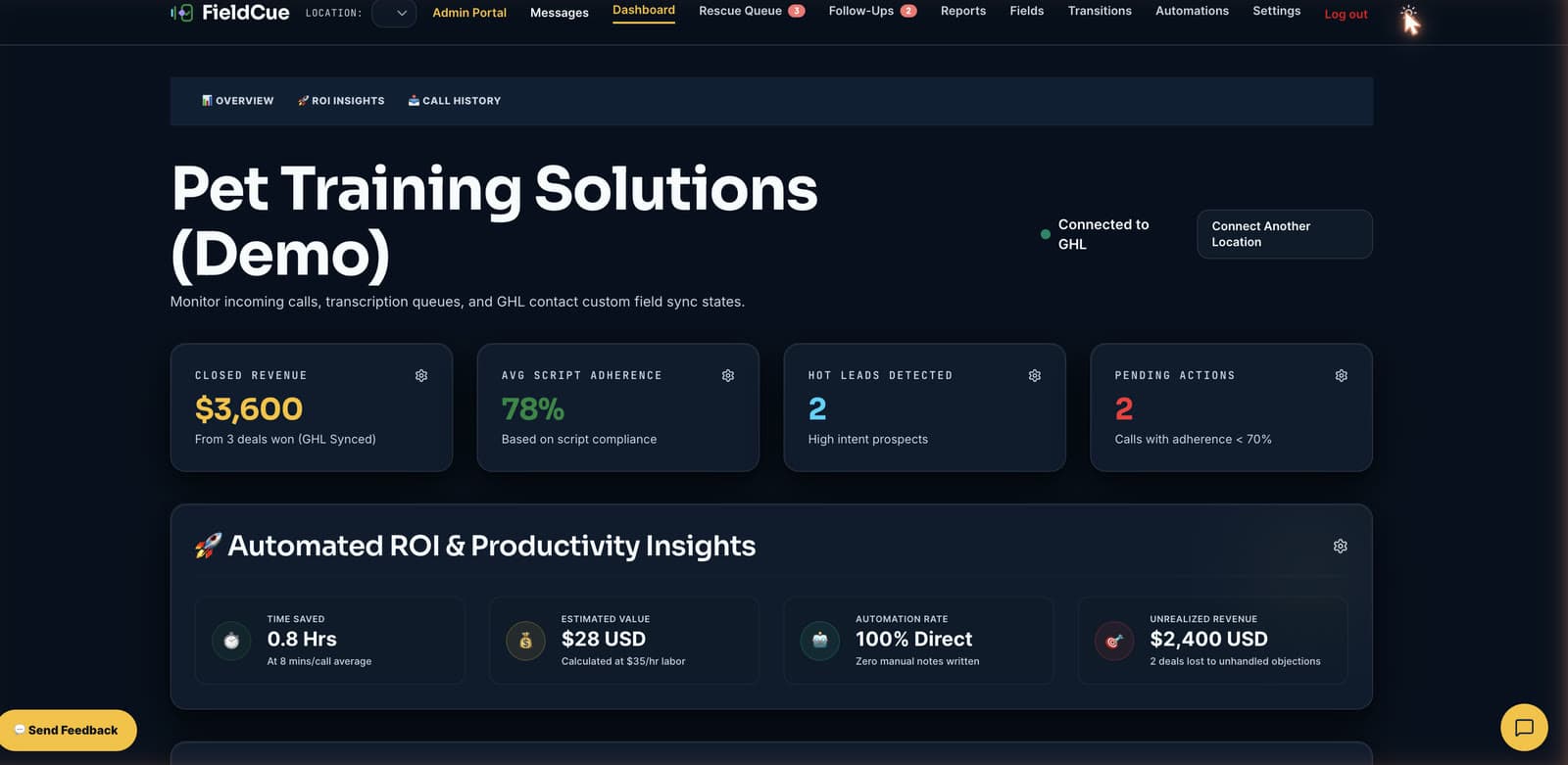
Inside FieldCue: Closer Replication Dashboard
Frequently Asked Questions
Can MeetGeek integrate with GoHighLevel?
No documented first-party integration. MeetGeek can send summaries, highlights, next steps, and tasks, and create or associate deals in certain supported CRM integrations, but lacks native GHL custom-field and agency automation.
Other Related Comparisons
Audit GHL phone calls natively with FieldCue
Authorize your location sub-accounts and stop paying for third-party automation middleware tasks today.